Alienware Batteryv0.2.0bar-widget
A battery that leaves your thermal profiles alone.
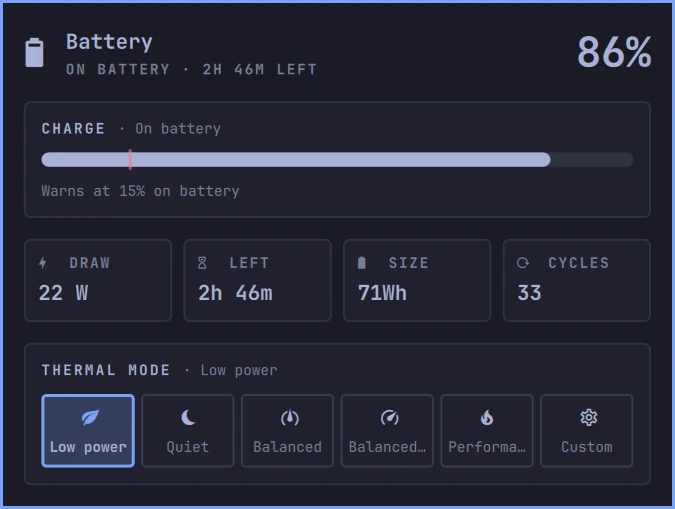
Omarchy's Power widget carries a power-profiles picker, and power-profiles-daemon fights the Alienware thermal profiles. This one drops the picker and puts the thermal profiles in its place: charge, rate, time left, battery size and cycles, with optional refresh rate and profile switching when you unplug.
Install
omarchy plugin add https://github.com/chr0nzz/omarchy-alienware-battery.git --enableUpdate with omarchy plugin update xyzlab.alienware-battery, remove with omarchy plugin remove xyzlab.alienware-battery.
Needs
- Omarchy 4 shell
- A battery. On a machine without one the widget hides itself
- Optional alienwarectl, from the Alienware plugin, for the thermal profiles
Then set it up
What to do once it is installed. Anything marked optional can wait.
Remove Omarchy's Power widget
Open the Omarchy bar settings, remove Power, then drag this one into the gap it left. Skip this and you get two batteries in the bar, and the power-profiles picker you came here to lose is still there fighting your thermal profiles.
Bind a key
Opens the details, where the arrow keys move between the profile buttons and Enter picks one.
In
~/.config/hypr/bindings.luao.bind("SUPER SHIFT", "B", "Battery", "omarchy-shell shell summon xyzlab.alienware-battery '{}'")Follow the power source with the refresh rate
optionalOnly the internal panel is touched, only when that rate is in its mode list, and only when it is not already there. External monitors are left alone. Leave either at 0 to not touch the rate at all.
omarchy bar set xyzlab.alienware-battery batteryHz 60omarchy bar set xyzlab.alienware-battery acHz 240Drop to low power on battery
optionalSwitches the thermal profile when you unplug and puts the previous one back on mains. Needs alienwarectl from the Alienware plugin.
omarchy bar set xyzlab.alienware-battery lowPowerOnBattery trueTake over the low battery warning
optionalOmarchy ships a battery service that already sends this. Leave it off unless you have disabled that service, or you will get the warning twice.
omarchy bar set xyzlab.alienware-battery notifyLow true
In Tokyo Night
Every shot was taken on a real Omarchy desktop with that theme applied. Pick another and they follow.
Draw and time left, with the Alienware thermal profiles underneath.
What it does
No profiles picker
The power-profiles picker is what fights the Alienware thermal profiles, so it is not here. The thermal profiles sit where it used to be.
The numbers that matter
Charge, draw or charging rate, time left or time to full, battery size, charge cycles, and the charge limit when one is holding.
Thermal profiles
Profile buttons through alienwarectl. Arrows move between them, Enter picks one, and a middle click on the bar steps to the next. They disappear on a machine without the helper.
Urgent at your number
The icon turns urgent on battery at or below a charge you pick, anywhere from 5 to 50 percent.
Refresh rate follows the power
60 on battery and 240 on mains, if you want it. Only the internal panel, only when that rate is in its mode list, and only when it is not already there. External monitors are left alone.
Low power on battery
Optionally drops the thermal profile to low power when you unplug and puts the previous one back on mains.
Stands on its own
It works without the Alienware plugin. You just do not get the thermal profiles.
Keys
| Keys | Action |
|---|---|
| Left click | Open the details |
| Right click | Show or hide the percentage |
| Middle click | Next thermal profile |
| Arrows | Move between the profile buttons |
| Enter | Apply the highlighted profile |
| Esc | Close |
Settings
Change any of these from the bar settings, the plugin's own settings editor, or omarchy bar set xyzlab.alienware-battery <key> <value>.
| Key | Purpose |
|---|---|
| showPercentage | Charge percentage beside the icon |
| lowBattery | Charge, 5 to 50, that turns the icon urgent on battery |
| showProfiles | Thermal profiles when alienwarectl is installed |
| batteryHz | Panel refresh rate on battery, 0 leaves the rate alone |
| acHz | Panel refresh rate on mains, 0 leaves the rate alone |
| lowPowerOnBattery | Switch to the low power profile on battery, and back on mains |
| notifyLow | Send the low battery warning, for when Omarchy's battery service is off |