xyzlab / xyzlab.pigeon
Pigeon
Pigeon keeps a live subscription open to ntfy.sh or your own server and turns every message into an Omarchy toast and an entry in a themed inbox with topic tabs, search, actions, attachments and a compose box.
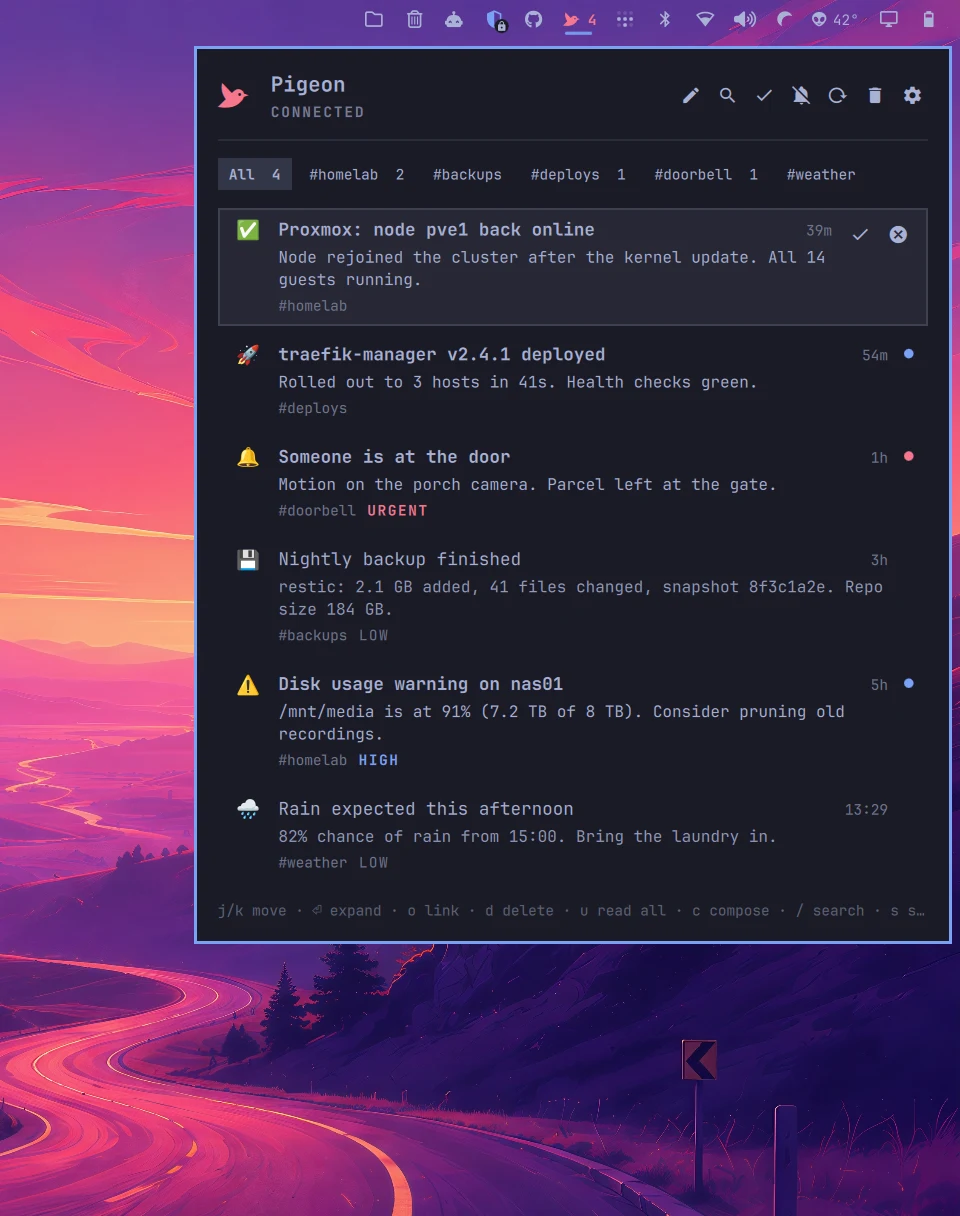
Screenshots
In Tokyo Night. Press T for the next theme.
The inbox, with topic tabs, unread dots and priority labels.
What it does
Your ntfy inbox, in the bar.
Always connected
One JSON stream per subscription with automatic reconnect, a keepalive watchdog and catch-up after sleep. Inbox and read state survive shell restarts.
Any server
ntfy.sh or your own instance behind a reverse proxy. Anonymous, access token, or username and password.
Native toasts
Every message becomes an Omarchy toast with its emoji tag and ntfy priority mapped to urgency. Messages that arrive together become one toast.
A proper inbox
Topic tabs, search, unread dots, expand in place, image preview, view and http actions, open link, copy, delete, mark read or unread, mute and reconnect.
Compose
Publish from the panel with a topic picker, title and priority. Your own messages arrive already read and never toast.
Keyboard first
j and k move, h and l switch topics, o opens the link, c composes, / searches. The bar pill follows the theme and works in any section.
Scriptable
Status, publish, mute, clear and reload over omarchy-shell IPC.
Sensible limits
Oversized lines are dropped, publisher http actions are off until you allow them, and a topic with no auth is treated as the public address it is.
Install
Add it to the bar.
omarchy plugin add https://github.com/chr0nzz/omarchy-pigeon.git --enableomarchy bar set xyzlab.pigeon server https://ntfy.example.comomarchy bar set xyzlab.pigeon topics alerts,homeUpdate later with omarchy plugin update xyzlab.pigeon. Remove with omarchy plugin remove xyzlab.pigeon.
Needs
Requirements
- Omarchy 4 shell
- curl, jq and wl-copy, shipped with Omarchy
- pw-play or aplay for the optional chime
Keyboard
Hands stay on the keys.
| Keys | Action |
|---|---|
| j / k, arrows | Move the cursor |
| h / l | Switch topic tab |
| Enter, e | Expand or collapse, marks the message read |
| o | Open the message's click link |
| a | Open the attachment |
| 1 2 3 | Run the matching ntfy action |
| y | Copy the message |
| d, x, Delete | Delete the message |
| u | Mark all read in the current tab |
| m | Mute or unmute toasts |
| c | Compose. Enter sends, Esc closes |
| / | Search |
| s | Settings editor |
| r | Reload the backfill window |
| Esc | Close |
Settings
Set from the bar, or the CLI.
Every key below is a bar widget setting. Change it from the Omarchy bar settings, from the plugin's own settings editor, or with omarchy bar set xyzlab.pigeon <key> <value>.
| Key | Purpose |
|---|---|
| server | Base URL of the ntfy server |
| topics | Comma separated topic names |
| auth | none, token or basic |
| token | Access token for auth = token |
| username / password | Credentials for auth = basic |
| toasts | Desktop toasts for new messages |
| sound | A short chime with each toast |
| toastMinPriority | Lowest priority that produces a toast, 1 to 5 |
| backfill | History to load for a new topic: all, 12h, 3d or none |
| maxMessages | Messages kept in the inbox |
| allowHttpActions | Let publisher defined http actions run |
| showCount | Unread count next to the glyph |
| glyph | Replace the pigeon with your own glyph |
Scripting
Talk to it from a script.
Every plugin registers an IPC target with the shell, so a keybinding, a hook or a cron job can drive it.
omarchy-shell pigeon statusomarchy-shell pigeon publish alerts "Title" "Message"omarchy-shell pigeon mute 3600omarchy-shell pigeon reloadomarchy-shell shell toggle xyzlab.pigeon '{}'