xyzlab / xyzlab.omafile
Omafile
Omafile opens as a real window with tabs and dual panes, watches directories live, copies and moves in the background with progress, and puts places, drives, transfers and trash in the bar. It follows GNOME Files conventions, so the shortcuts you already know work.
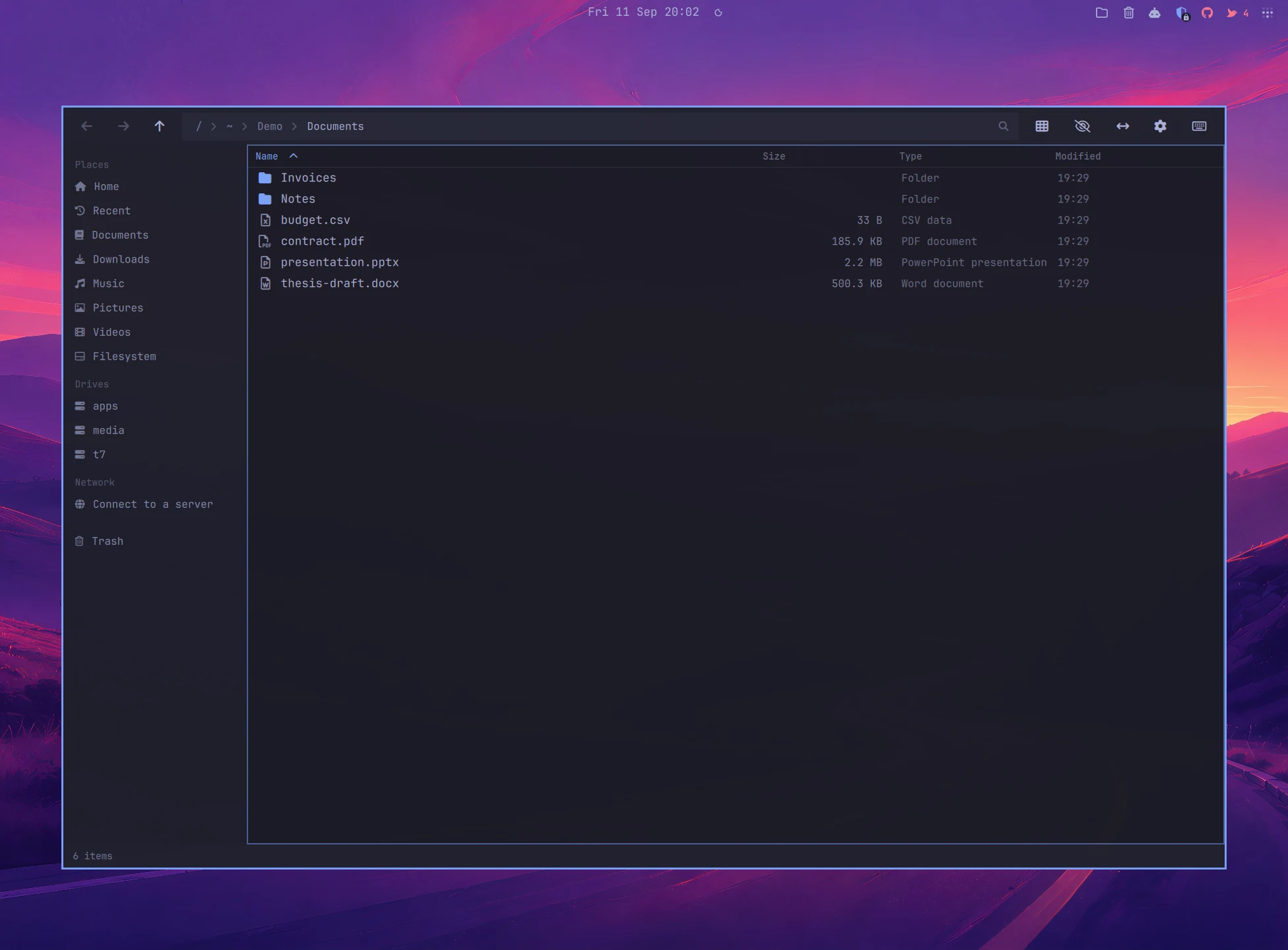
Screenshots
In Tokyo Night. Press T for the next theme.
The window, floating over the desktop with the wallpaper showing through.
What it does
A file manager that lives in the shell.
A real window
Resizable, tabbed, floating or tiled, or a popup panel centred over the desktop that closes when you click away. Switch between the two from Settings or the command line, even while it is open.
Dual panes
F6 splits the window. Tab hops between panes, Ctrl+Shift+C and Ctrl+Shift+M copy and move to the other side with one key.
Live directories
External changes appear the moment they happen. No refresh, no stale listings.
Background transfers
Copies and moves run in a helper process with persistent progress. The bar icon shows a ring while they run, and conflicts ask what to do.
Trash that counts
Freedesktop trash compatible with GNOME Files, with undo for trash, rename, move, copy and new items. An optional trash can in the bar shows a live count across every trash directory on the system.
List and grid
Ctrl+1 and Ctrl+2 switch views. Grid view shows image previews, list view shows size, type and modified.
Search and filter
Just type to filter the folder you are in. Ctrl+F searches everything inside it.
Network drives
Connect to SMB, SFTP, FTP and WebDAV through GVFS. Servers you have used before are one click away, and advertised servers appear alongside them.
Places in the bar
The bar widget opens the file manager, jumps to a place or a drive, watches transfers and empties the trash.
Default file manager
One switch makes folders opened from other apps land in Omafile, and Show in folder opens the containing folder with the file selected.
Install
Add it to the bar.
omarchy plugin add https://github.com/chr0nzz/omarchy-omafile.git --enable --yesUpdate later with omarchy plugin update xyzlab.omafile. Remove with omarchy plugin remove xyzlab.omafile.
Needs
Requirements
- Omarchy 4
- Python 3, included with Omarchy
- util-linux lsblk and findmnt
- Optional udisksctl for ejecting drives
- Optional gvfs and gvfs-smb for network servers
Keyboard
Hands stay on the keys.
| Keys | Action |
|---|---|
| Enter | Open the selected item |
| Backspace / Alt+Up | Go to the parent folder |
| Alt+Left / Alt+Right | Back and forward |
| Ctrl+L, / or ~ | Type a path |
| Ctrl+T / Ctrl+W | New tab and close tab |
| F6 | Split into two panes |
| Tab | Sidebar, or the other pane when split |
| Ctrl+Shift+C / Ctrl+Shift+M | Copy and move to the other pane |
| Ctrl+1 / Ctrl+2 | List and grid |
| Ctrl+H | Show hidden files |
| Ctrl+F, or just type | Search in this folder |
| Ctrl+C / Ctrl+X / Ctrl+V | Copy, cut and paste |
| Ctrl+Z / Ctrl+Shift+Z | Undo and redo |
| F2 | Rename |
| Ctrl+Shift+N / Ctrl+N | New folder, new file |
| Delete / Shift+Delete | Move to trash, delete permanently |
| Ctrl+D | Bookmark this folder |
| Ctrl+Comma | Settings |
| F1 | The shortcut list |
| Ctrl+Q / Escape | Close the window |
Settings
Set from the bar, or the CLI.
Every key below is a bar widget setting. Change it from the Omarchy bar settings, from the plugin's own settings editor, or with omarchy bar set xyzlab.omafile <key> <value>.
| Key | Purpose |
|---|---|
| homePath | Default directory when opening Omafile |
| showHidden | Show hidden files and folders by default |
| sortBy | Sort by name, size, modified or type |
| sortDirsFirst | List directories before files |
| confirmDelete | Prompt before deleting items |
| useTrash | Send deleted items to trash instead of deleting |
| defaultView | Start in list or grid view |
| terminal | Terminal command to open in the current directory |
| editor | Text editor command for selected files |
| showTransferBadge | Progress ring on the bar icon while a transfer runs |
| showDrives | Show the Drives section in the sidebar |
| thumbnails | Image previews in grid view |
| windowMode | Open as a window or a popup |
| mode | files for the file manager icon, trash for a trash can |
| trashConfirm | Ask before a right click empties the trash |
| glyph | Custom icon for the bar widget |
Scripting
Talk to it from a script.
Every plugin registers an IPC target with the shell, so a keybinding, a hook or a cron job can drive it.
omarchy-shell omafile open /path/to/directoryomarchy-shell omafile reveal /path/to/fileomarchy-shell omafile trash /path/to/itemomarchy-shell omafile windowmode popupomarchy-shell omafile trashicon onomarchy-shell shell toggle xyzlab.omafile '{}'